
Most people think Tor (The Onion Router) is something sinister. Drug markets, hitmen, hackers in hoodies, the dark web — a digital underworld that exists solely for people who have something to hide. That reputation has been shaped by years of media coverage and law enforcement press conferences that treat Tor as a criminal tool rather than what it actually is: a privacy technology developed by the United States Military.
The U.S. Naval Research Laboratory developed onion routing in the mid-1990s to protect military communications. The irony is almost too perfect. The same tool that news segments warn you about was literally created to serve American national security interests.
The real story of Tor is far more mundane and far more useful than the mythology. And for parents thinking about digital privacy, it's worth understanding what it actually does, what it doesn't do, and why it might matter for your family.
The Deep Web in Plain English
Before we get to Tor itself, we need to clear up the confusion between three terms that get thrown around interchangeably: the surface web, the deep web, and the dark web. They sound like layers of conspiracy, but they're just different parts of the same internet you already use every day.
The surface web is what you can find through a search engine. Google, Bing, DuckDuckGo—all search engines index it. This article, your favorite blog, Wikipedia's homepage are all surface web. It's the part of the internet designed to be discovered.
The deep web is everything that isn't indexed by surface search engines. That sounds mysterious until you realize it includes your bank account dashboard, your email inbox, your child's school grade portal, your medical records and your company's HR system. Every time you log into something behind a password, you're technically on the deep web. It's not hidden because it's private, not criminal. The deep web is where most of the actual internet lives. Some estimates put it at hundreds of times larger than the surface web, and it's completely normal.
The dark web is a small subset of the deep web that requires a special software to access—specifically, the Tor network. It's a fraction of a fraction of the internet. Yes, it contains marketplaces for illegal goods. It also contains whistleblower platforms, forums for people living under authoritarian regimes, and .onion versions of mainstream news sites like the BBC, ProPublica, and the New York Times. More and more, companies are having their sites accessible through .onion URLs. The dark web is a tool, not a destination. What you find there depends entirely on where you point it.
Onion Routing, Simplified
So what does Tor actually do? Tor is an acronym for "The Onion Router" and the metaphor is surprisingly apt. When you visit a website normally, your computer connects more or less directly to that website's server. Your Internet Service Provider can see the destination, and the website can see your IP address, which reveals your general location. Anyone watching the traffic in between — and there are plenty of parties watching — can build a picture of who you are, what you're reading, and when you're doing it. This is what we've covered before when we talked about metadata—every connection leaves a trail.
Tor takes that trail and scrambles it. You need the specific Tor Browser to do this—it's not just a setting you turn on. When you use the Tor Browser, your internet traffic gets wrapped in multiple layers of encryption—like the layers of an onion—and then bounced through a series of volunteer-run computers called relays. Each relay peels off one layer of encryption, sees only the next relay in the chain, and forwards the traffic along. No single relay knows both who you are and what you're looking at. The entry node knows your IP address but not your destination. The exit node knows your destination but not your IP address. The middle relays know neither.
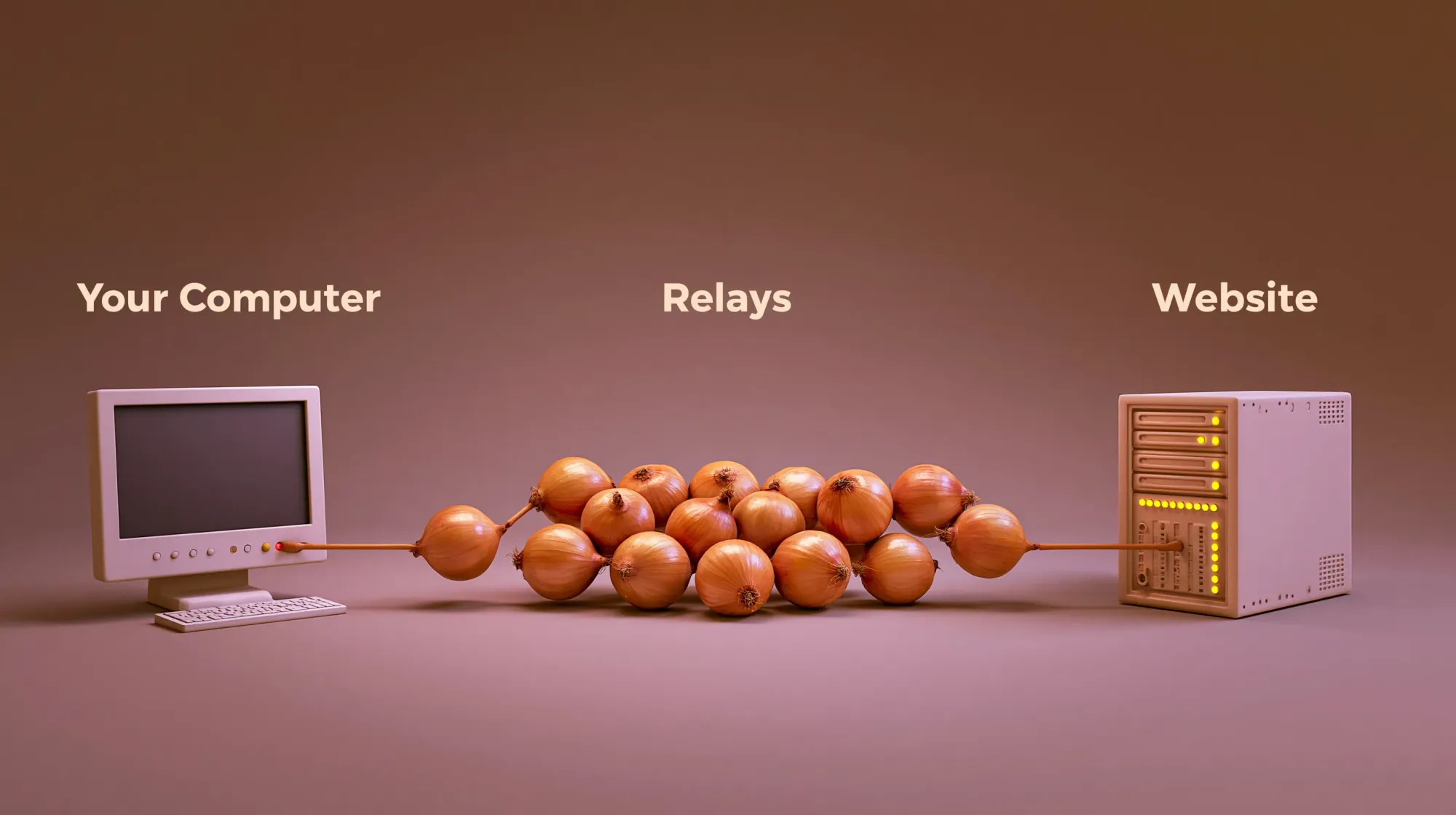
The result is that the website you're visiting sees the IP address of the exit node, not yours. Your ISP sees that you're using Tor, but can't see where you're going. Someone watching the website's server sees visitors coming from the Tor network, but can't trace them back to you.
It's a fundamentally different architecture than normal browsing, and it makes the kind of metadata collection we've written about dramatically harder.
Why a Parent Might Actually Use It
The use cases for Tor aren't exotic. They're practical, and some of them overlap directly with things we've already discussed in this publication.
If you need to research something sensitive — a medical condition, a legal question, a personal matter you'd rather not have tied to your identity — Tor prevents that research from becoming another data point in your metadata profile. Remember the example we used in our metadata article: searching "toddler fever 103" at 2 AM. With a normal browser, that search is logged, timestamped, and potentially used to build a behavioral profile. With Tor, the trail back to you is buried inside the network.
Journalists use Tor to communicate with sources in countries where the press isn't free. Activists use it to organize without government surveillance. People living under authoritarian regimes use it to access information their governments have blocked. The BBC maintains a .onion mirror of its news site specifically so that people in countries where BBC is censored can still read it. ProPublica was the first major news organization to launch a dark web version of its site, built to protect readers who could face consequences for reading investigative journalism.
For parents, the most honest use case is probably this: Tor shows you what the internet looks like without the tracking layer. Using it even once changes your mental model of how the web works. You'll notice things — how many sites break when they can't identify you, how many default to assuming you're a bot because you're not behaving like a tracked user, how different the experience is when you're not being profiled in real time. That awareness (what we talk about frequently) is valuable in itself. It's the difference between knowing intellectually that you're being tracked and feeling it.
And if your child has a technical bent—if they're the kind of kid who gets curious about how things work under the hood—Tor is an opportunity. Understanding onion routing means understanding encryption, network architecture, and the trade-offs between convenience and privacy. These are foundational concepts in modern technology literacy. We've talked before about channeling special interests into real skills. Tor sits squarely in that lane.
Getting the Browser
If you want to try it, the process is straightforward. The Tor Browser is free, open-source, and maintained by the Tor Project, a nonprofit that took over development from the original government researchers. You download it from the official site at torproject.org. There are versions for Windows, macOS, iOS, Android and Linux. On desktop, it's a modified version of Firefox with the Tor connection built in—no configuration required. You open it, it connects to the network, and you browse.
Here are a few things to expect. Tor is slower than a normal browser because your traffic is bouncing through multiple relays, often around the world, and that takes time. Pages load slower and streaming video can be painful. But this is a feature—the speed penalty is the cost of the anonymity. It also means Tor is a tool for specific tasks, not an everyday browser replacement. You use it when the privacy matters enough to accept the inconvenience.
Don't log into personal accounts while using Tor. If you log into your Gmail or your bank, you've just attached your identity to a session that was supposed to be anonymous. Tor protects your connection, but it can't protect you from yourself. The point is to browse without revealing who you are and logging in defeats that purpose.
The Neurodivergent Lens
There are two angles worth touching on here for neurodivergent families, and they pull in opposite directions.
The first is that ND kids with technical special interests will find Tor genuinely fascinating. The concept of onion routing is elegant, and it touches on cryptography, network design, and game theory all at once. If your child is the type who goes deep on how systems work—and many neurodivergent kids are exactly that type—Tor is a worthy rabbit hole to fall down. It teaches real engineering concepts, demystifies a piece of technology that's been sensationalized, and it reinforces the broader lesson that understanding how things work is the best defense against being manipulated by them.
The second is about framing. Neurodivergent kids who take things literally may absorb the "Tor = criminals" messaging and either fear it or be drawn to it for the wrong reasons. Neither response is helpful and the fear response shuts down curiosity about a legitimate technology. The forbidden-fruit response glamorizes something that's actually quite mundane. The reframe is simple: Tor is a privacy tool, not a forbidden zone or a criminal shortcut. It's software that changes how your connection works, built by researchers, funded initially by the military, and now maintained by a nonprofit. Framing it that way removes the mystique without removing the value.
What Tor Is and Isn't
Tor is not a magic invisibility cloak. It's one tool with specific strengths and specific limitations, and using it well means understanding both.
- Tor anonymizes your connection. It does not encrypt everything by default. If you visit a website that doesn't use HTTPS, the exit node — the last relay in the chain — can see your unencrypted traffic. The solution is straightforward: look for the padlock icon in the address bar, the same way you would in any browser. Most of the web is HTTPS now, but it's worth knowing.
- Using Tor doesn't hide the fact that you're using Tor. Your ISP can see that you're connecting to the network. Websites can detect that you're arriving via a Tor exit node. In some cases, sites will block Tor traffic entirely or throw CAPTCHAs at you. This is expected and it's the trade-off for anonymity. Exit nodes are publicly mapped and observable (see tormap.org for a current list). This doesn't mean your traffic is being read by default, but it does mean sophisticated actors know when TOR is being used and can monitor known exit points.
- Tor is not a VPN. A VPN routes your traffic through a single server and encrypts the connection between you and that server. Tor routes through multiple relays with layered encryption. A VPN is faster and Tor is more anonymous. They serve different purposes, and in some cases they complement each other—however combining them adds complexity and can actually reduce anonymity if not configured correctly. For most parents, the Tor Browser alone is enough for occasional privacy-sensitive browsing.
- Tor won't protect you from everything. If you download a file through Tor and then open it outside the browser, it can connect to the internet normally and reveal your identity. If you share personal details while browsing through Tor, you've compromised the anonymity yourself. The tool can only do so much, the rest is on you.
- TOR won't protect you from everyone. Advanced adversaries (nation-states, well-resourced organizations) can use traffic correlation techniques to potentially identify users. Exit nodes are tracked and mapped. Anonymity isn't a yes/no question—it's about threat models. For a parent researching sensitive topics, TOR is still a major upgrade over regular browsing, but if you're actively being targeted, you need more.
Wrapping It Up
Tor is what the internet looks like when you strip away the tracking infrastructure. It's slower, clunkier, and less convenient. It breaks some sites and frustrates others. But it gives you a glimpse of what a privacy-respecting web feels like. A web where your searches aren't logged, your reading habits aren't profiled, and your connection isn't a commodity.
You probably won't use Tor every day. Most people just don't need to. But understanding what it is, how it works, and why it exists changes how you think about the default internet you do use every day—the one that tracks you by design. The awareness is the point: knowing the onion exists, what it does, and that you have the option to step inside it whenever the default feels too exposed.
